



Do you recognize the name MJT Software? You should. They make one of our favorite Windows Media Center plugins: Recorded TV HD. Well, that same developer is back with another great Media Center plugin. This time they have focused on one of our favorite aspects of Windows Media Center: the screen saver. If you’ve never used Media Center that probably sounds ridiculous, but for anyone who has you’ll completely understand why we love it so much. At its roots it’s just a photo slide show, but we’ve always loved the way in which it displays the photos. We’ve often found ourselves just sitting and watching the screen saver instead of TV!
Mark Terborg, the man behind MJT Software, found himself often watching that screen saver too. The difference between him and us? He wanted it to be even better, so he did just that! He’s now launching a new product called My Memories for Windows Media Center.
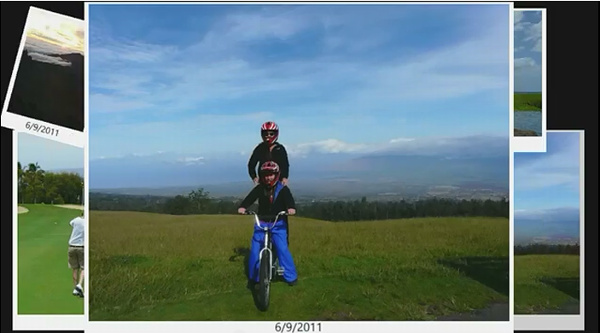
My Memories is a replacement for the photo screen saver in Windows Media Center. For it to replace the built-in screen saver it’s going to have to be really good. As soon as it ran for the first time I knew it would do just that! Instead of just displaying one photo at a time it throws a handful of photos up on the screen at once. They are displayed like Polaroid pictures, with the date the photo was taken in the white matte section. Every few seconds (which is configurable) it will display another group of photos, but when it does so it will display them in a different layout.
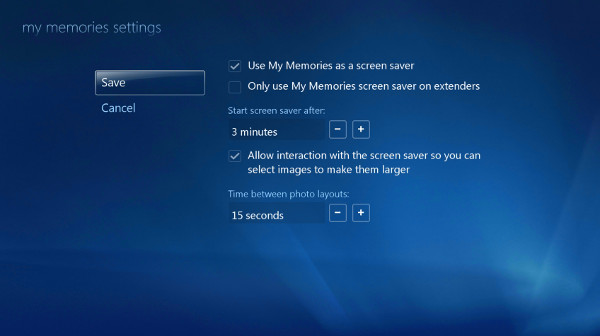
The display of the photos is really nice, but what really sets My Memories apart is that it’s also interactive. On the surface that sounds silly. Why would you want to interact with a screen saver? You have to remember that these screen savers are so good that you’ll find yourself choosing to watch them. So what’s interactive about it? You can use the remote (or arrow keys on the keyboard) to select one of the currently displayed photos and zoom in on it. If, for some reason, you don’t want to enable the interaction you can turn that off in the settings. You can also customize how long the Media Center should be idle before displaying the screen saver.
There’s one other great feature to My Memories. It works on Windows Media Center Extenders! The built-in screen saver doesn’t even do that. Sticking with the theme of customizability, you can even configure My Memories to only be displayed on your extenders if you would prefer to stick with the built-in screen saver on your PC.
 My Memories is a great Windows Media Center plugin, and we can easily see it being one of our most recommended plugins. There is one thing we wish we could change. By default it randomly picks from all the photos in your photo library. There is a way to customize what folders are used by the plugin, but it’s a little more work than we would like. You can find the instructions in the FAQ. Also, if you’ve made the jump to Windows 8 you’ll be happy to know that My Memories even runs on Windows 8 Media Center.
If My Memories sounds interesting you should head on over to the website and download the free demo. The limitation to the demo is that it occasionally replaces some of the images in the slide show with a demo image encouraging you to purchase it. If you like it then purchasing it won’t break the bank. You can buy the full version for only $5.



[…] via www.thedigitalmediazone.com […]
Photograph screensavers are as old as time itself.. does anyone use them?. The reason I ask is because your TV will be turned off if you’re not watching media?
[…] Media Center My Memories […]
While I agree that photo screensavers for a computer seem silly, the WMC photo screensaver is great. I can’t tell you the hours we’ve wasted staring at pictures after it starts. I went ahead and bought this app because I want to support the developer (He also makes Recorded TV HD) and it’s a really nice app. I know WMC is dead to Microsoft, but it still works better than any other DVR available. I’m just glad someone is still creating programs for it.
[…] Announcing My Memories for Windows Media Center […]
[…] taken. There’s a lot to love about My Memories, and for more details you can check out our announcement post from when it was first made […]