


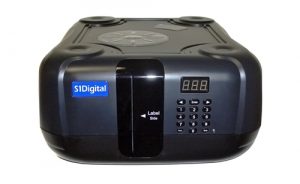
 Today S1Digital officially released a USB 100 Blu-ray disc changer for use with Windows Media Center. The device can be hooked up directly to your Windows Media Center PC (Vista or Windows 7) or a Windows Home Server. The movies on those discs will then be immediately accessible from within any Media Center using the included My Movies software. The cover art and metadata for the movies is automatically downloaded when using this new device. It can also be used to rip your movie collection to a hard drive without the hassle of constantly having to switch discs. You simply put in up to 100 Blu-ray discs and tell it to start ripping and it will rip each disc, one after the other, until it’s complete. Ripping software is not included, but if you are going to pay $1500 for the device, you can probably manage to pay for a copy of your favorite ripping tool.
From the S1Digital product page:
[tags]media center, s1digital, htpc[/tags]When connected to an S1Digital Media Center (or any third party Microsoft Windows 7 or Vista PC that includes media center) you’ll be able to load up to 100 Blu-ray and/or DVD movies into the S1Digital Bly-ray Disc Changer. Using the included My Movies software, each disc will be scanned and metadata and cover-art automatically downloaded to the server. Once catalogued, you can view more information about the movie, or watch the movie by selecting the appropriate cover-art, which is all available on the familiar and easy-to-use media center interface. The changer is simple to use and enables almost instant access to movies without having to physically find and load each movie. (Please note that this feature will be available soon).


