Netflix is just about everywhere now. It is built into just about every blu-ray player, video game console, television, set top box, and now even cell phones. So it only makes sense that Netflix would become available for the brand new Nintendo 3DS. It has a widescreen display, WiFi built in, and of course the 3D screen. Netflix on the Nintendo 3DS has the opportunity to do something cool, which is offer glasses free 3D movies in the palm of your hand. While Netflix and Nintendo have only hinted at offering this type of content (similar to the Nintendo Video Channel) nothing is 100% official. This doesn’t stop you from enjoying all of Netflix on the go. The real question is how does it perform?
Setup
 If you have setup Netflix on any other device before then this will not be new to you. Simply boot up the Netflix app on the 3DS, go to netflix.com/activate, enter your code, and boom you are good to go. It is like magic basically and it works just as you would expect.
User Interface
 When I heard Netflix was coming to the 3DS I thought that they would simply implement instant queue mode and be done with it. However, I was extremely surprised to find out that they implemented the entire Netflix UI (similar to Roku) with Instant Queue, Recommendations, Recently Watched and more. Surprisingly having 2 screens allows the Netflix app to show a log of data at one time on the small screens. The bottom screen is dedicated to navigation through the different titles, while the top screen displays information and rating for the selected title. I will say that it does take a bit of time to load the main UI, but once it is loaded it is relatively snappy. It loads all cover art on demand so the box art will pop in as you scroll through. I honestly think they are displaying too much at one time and it can slow down and get a bit laggy in my opinion, but overall it’s pretty impressive.
You are even able to search inside of the app if you cannot find anything to watch on the main screen. It will start searching for content as soon as you start typing which is a nice feature, but it does take some time to search through the directory. You can navigate through the menu by using the d-pad or by busting out the stylus (no chance of using your fingers here). Navigating through just about all the panes left me wanting it to be faster. It is all going to depend on your internet speed, but I feel as though it all could have been a bit snappier.
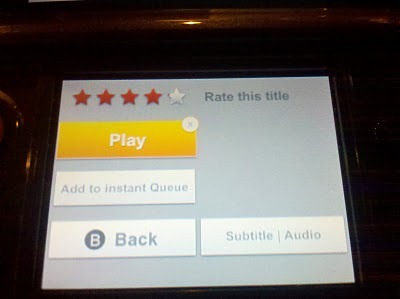 One of the things I really liked is that when you select a title you are able to rate, play, add to instant queue, and even enable or disable subtitles for it.
Streaming
 Once you have selected a title you can simply press play and it will buffer and start playing. Since the Nintendo 3DS screen is relatively small, 400x240px, it doesn’t really need to stream the highest quality video to make it look half-way decent. I was actually pretty surprised by the quality that was displayed on the 3DS. It was 100% very watchable. Not very pixelated at all and I could honestly say that I wouldn’t mind watching it on the tiny little screen if it was my only option. One bigger issue though is that the Nintendo 3DS speakers are actually pretty quiet. I never really realized it until now, but on some game titles and especially Netflix the audio is very quiet. If you are not in a silent room you will absolutely have to plug in headphones. I actually recommend that you do no matter what. If they happen to be Beats By Dr. Dre then so be it :).
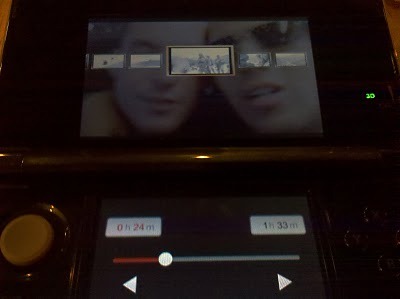 While you are streaming a video you are also able to pause, stop, rewind, and fast forward just like you would expect. You even get the cool frame by frame rewind/fast forward. You can simply press on the touch screens timeline to skip ahead or back. It will buffer the movie again and start streaming.
Battery Life
The big question really is how long will the battery last when streaming video? The 3DS battery isn’t a powerhouse and only last up to 5-6 hours when playing games if you are lucky. So let’s just say I was pretty worried that I wouldn’t even make it through a full length movie. I decided to fully charge up my 3DS and start a stream of the 2 Hour long Halo Legends movie. After it was all said and done to my surprise Netflix only drained 25% of the battery. Of course there is no way to tell if it was closer to draining 50% of the movie, but after watching Halo Legends again I still had 25% battery, which means you should be good to watch around 5-6 hours of content on a full charge. I think this is pretty impressive.
Issues
I will say that I have had some issues with Netflix on the 3DS. Sometimes the UI will freeze up or refuse to start buffering a video. I have found a simple work around which is to perform a full shutdown of the system, turn it on, and then boot up Netflix. My feeling is that I always keep it in sleep mode and perhaps something is hogging up the internal memory. So before I start up Netflix I simply perform this reset.
Conclusion
Alright so it might not be perfect, but it totally works and that is surprising. I wouldn’t say that it offers the best Netflix experience, but if it is your only option for the time being it is a pretty decent alternative to nothing. The real incentive will come in when they start to offer 3D movies and television through Netflix which I am sure they will do at some point. For now it is nice to have just incase you want to watch some Netflix on the go (and WiFi is around.) Oh it is also a free app, so you can’t go wrong there.
And now for some awesome Videos!!!
Netflix running on Android and Nintendo 3DS:
Here is Netflix running on my Windows Phone 7: